JR-100 GAMES

METRO WEAVE

Operate junctions and signals to deliver trains to stations with matching letters. Each shift has eight trains. Regular services depart automatically; RETURN dispatches the next train early as an express. Initially two trains may run together, rising to three later. Destinations vary each game, with the next three departures shown in advance.

分岐と信号を操作し、列車を同じ文字の駅へ届ける運行ゲームです。各シフトは8本。通常便は自動で出発し、RETURNで次の1本を急行として早く出せます。同時運行は最初が2本、後半は3本まで。行先の順番はプレイごとに変わり、次の3本を予告します。

metro-weave.prg · v2.0.0 · 11.1 KiB · 16 KB RAM · Autostart ready自動起動対応

Start on MiSTerMiSTerで起動

  1. Copy the .prg into games/JR100/ on your SD card..prgをSDカードのgames/JR100/へコピーします。
  2. In the JR-100 core menu, set Autostart loaded program to Yes.JR-100コアのメニューでAutostart loaded programをYesにします。
  3. Choose Load PRG, select the game, then press RETURN at its title.Load PRGでゲームを選び、タイトル画面でRETURNを押します。

Still at READY? TypeREADYで止まる場合は A=USR($0300) and press RETURN.を入力してRETURN。 First-time setup / SuperStation One初回設定・SuperStation Oneの手順

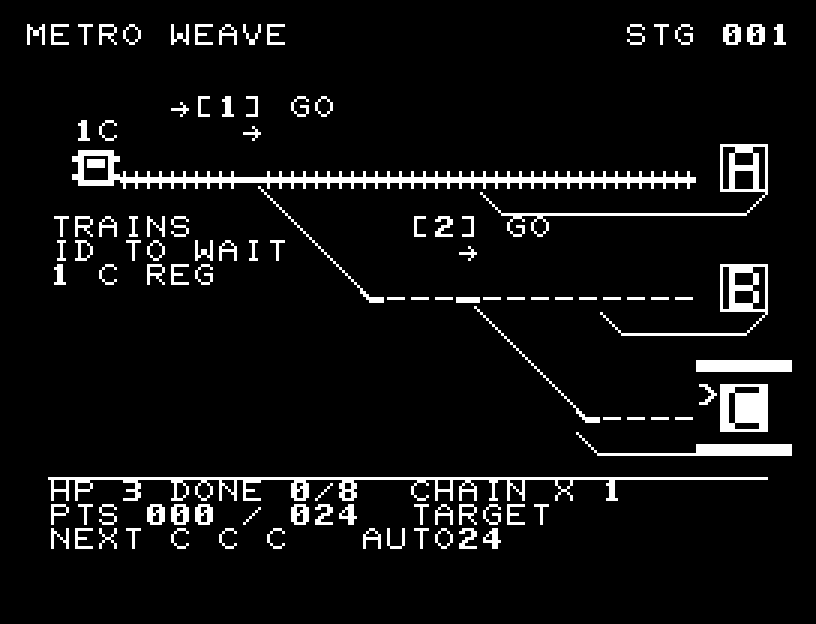
METRO WEAVE — At the start
At the start開始時の盤面
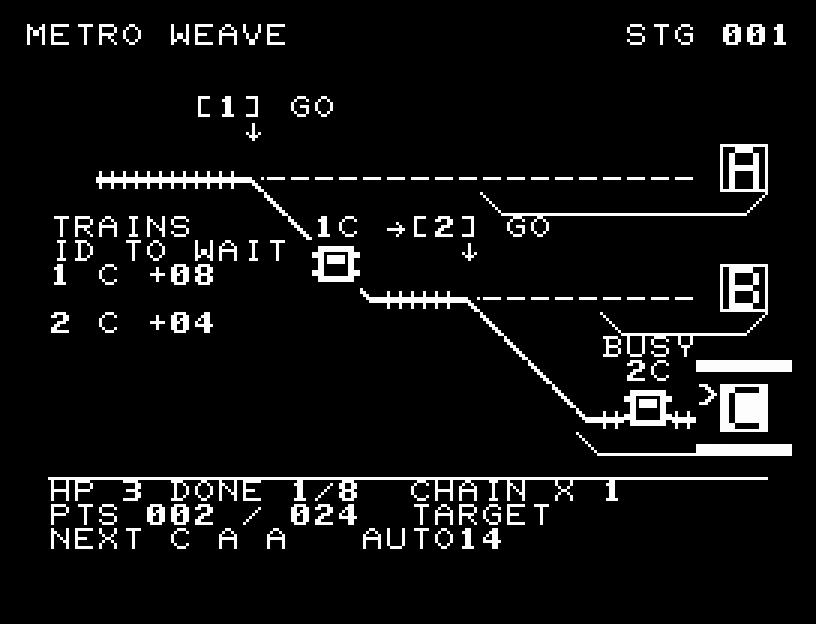
METRO WEAVE — In play
In playプレイ中
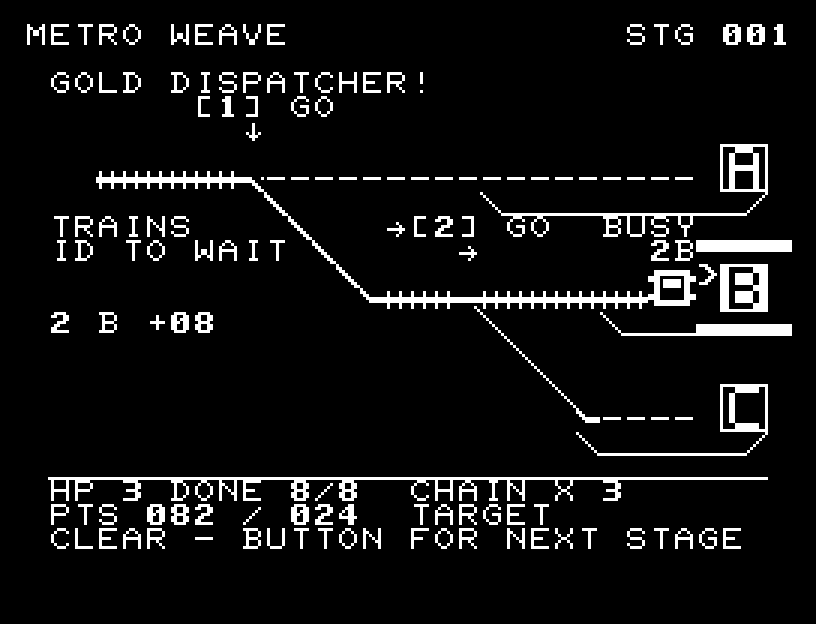
METRO WEAVE — First goal reached
First goal reached最初の目標を達成

First stage cleared.1ステージのクリアまでを収録。

Controls and play

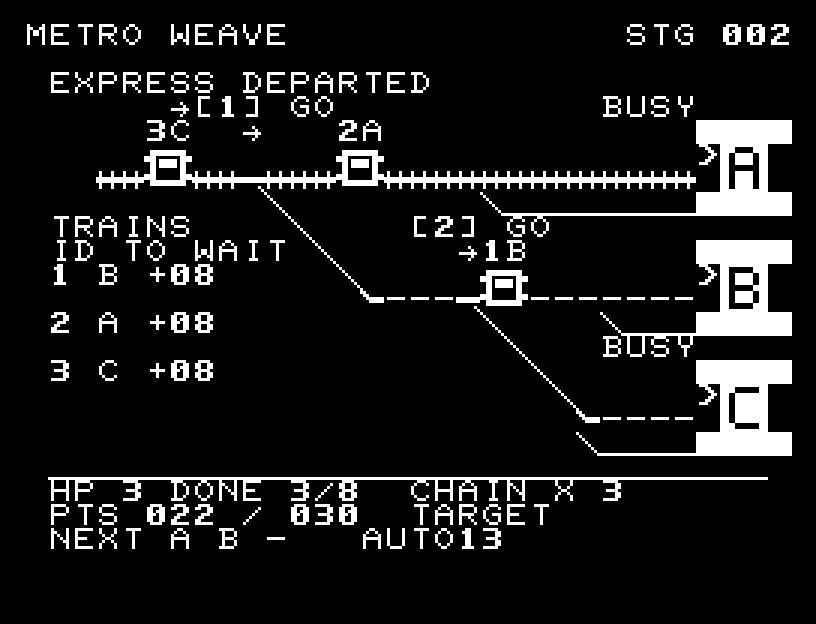
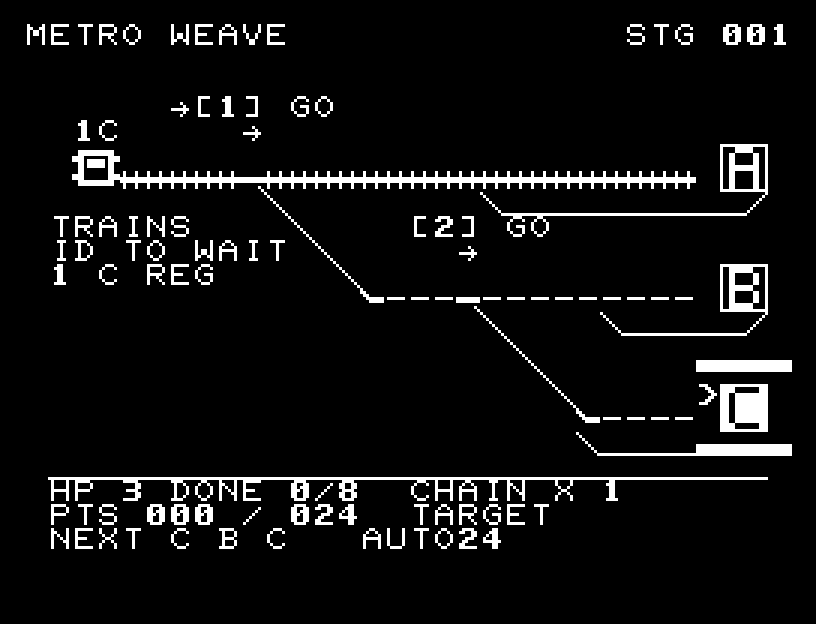
W/S selects junction 1 or 2. D changes its route; A toggles STOP/GO. Junction 1 sends trains straight to station A or down to junction 2. Junction 2 sends them straight to B or down to C. Thick rails show the selected route. Trains follow the setting when they reach a junction, and settings persist until you change them. Watch the number and destination beside each train and the illuminated station signs.

Directions work on the keyboard or pad; the pad button also acts as RETURN. SPACE opens confirmation to restart this stage. NO is selected initially. Choose with A/D, confirm with RETURN, or cancel with SPACE. Play pauses during confirmation. CTRL+C returns to BASIC.

Across three shifts, automatic dispatch becomes faster and concurrent trains increase from two to three. Read the next three destinations before adding express services. Express trains are worth more, but delays at signals and unloading stations can cost HP and break your success streak. Trains move one cell at a time and maintain spacing automatically. The playfield shows trains, routes, destinations, waiting time, and score; controls are collected on the title/help screens. Wait for animations to finish before pressing again.

A regular delivery earns 2 points; an on-time express earns 4. Consecutive successes raise the multiplier to ×2 and ×3. An express train's WAIT value is its remaining allowance for stopping; !00 means it is late. A BUSY station makes a train wait for unloading, and following trains stop to maintain spacing. Sending several expresses to the same station easily causes delays. Decide whether to wait for a regular departure or add an express by reading upcoming destinations and congestion.

A wrong delivery or delay costs 1 HP and breaks the streak. Operate all eight trains before HP reaches zero and score at least 24, 30, and 36 points in shifts 1, 2, and 3 respectively. Score 44 for SILVER or 60 for GOLD.

More screenshots
METRO WEAVE: play 01

METRO WEAVE: play 02

操作と遊び方

W/Sでポイント1・2を選び、Dで進路、AでSTOP/GOを切り替えます。ポイント1はA駅への直進かポイント2への下り、ポイント2はB駅への直進かC駅への下りです。太い線路が現在の経路です。列車は到達した時点の設定に従い、設定は手で変えるまで保ちます。列車のそばの番号と行先、点灯した駅看板を見て運行してください。

方向キーはキーボードまたはパッド、RETURNはパッドのボタンでも操作できます。SPACEでこの面のやり直し確認を開きます。やり直し確認はNOが初期選択です。A/Dで選び、RETURNで確定、SPACEで取り消します。確認中は進行を止めます。CTRL+CでBASICへ戻ります。

3シフトで自動配車が速まり、同時運行数が2本から3本へ増えます。毎回変わる次の3本を読み、急行を手動増発できます。急行は得点が高い一方、信号待ち・荷下ろし待ちで遅延し、HPと連続成功を失います。車体は1マスずつ動き、自動で車間を保ちます。常設の操作説明はタイトル・ヘルプへ移し、本編は列車・進路・行先・待ち時間・得点を表示します。演出が終わってから次のキーを押してください。

通常便は2点、時間内の急行は4点。連続成功で得点が2倍、3倍になります。急行のWAIT欄は停車できる残りの猶予で、!00になった列車は遅延です。駅のBUSY中は荷下ろし待ちになり、後続列車も自動で間隔を空けて停まります。同じ駅へ急行を詰めると遅れやすいため、次の行先と混雑を見て通常便を待つか急行を出すか判断します。誤配や遅延はHPが1減り、連続成功も途切れます。HPが0になる前に8本を運行し、1・2・3シフトでそれぞれ24・30・36点を取るとクリア。44点でSILVER、60点でGOLDです。

ゲーム開始時

プレイ中の場面